


Mazda Connect Firmware Update 70.00.335 NA
Firmware Features:
- Apple Carplay and Android Auto support
- Bugs Fixes
For more info:
[/vc_column_text][/vc_column][/vc_row]NA N – Region NORTH AMERICA
USA, Canada, Mexico, Puerto Rico, known as ‘NA N’ on your Touchscreen.
Mazda 2 2014-2025*
Mazda 3 2014-2018*
Mazda 6 2015-2025
Mazda Mx-5 2014-2024*
Mazda Cx-3 2014-2025
Mazda Cx-5 2015-2025*
Mazda Cx-9 2015-2025*
* Not for Mazda Connect System 2 with 10,25 inches / 26 cm display. Only for Mazda Connect 1 gen.
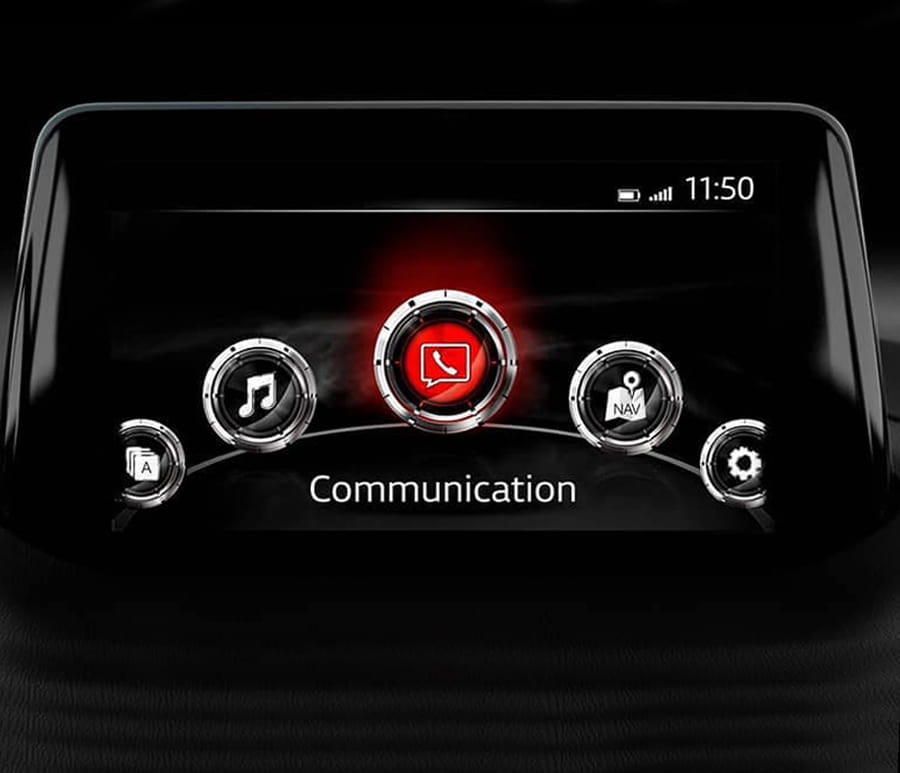
If you don’t know what is Mazda connect and Mazda connect 2 – this firmware is only for cars with a main menu on the screen that looks exactly like the one in the photo above.
• In the CMU update package, the latest Gracenote® database has been included.
• The System Update screen menu shows “Update package” instead of “Reinstallation Package”. The Fail-Safe Package” has been removed.
• The brand icon on CarPlay screen has been updated.
• Font and location of texts like i-stop, i-ELOOP and average data on Fuel Economy Monitor screen have been improved.
• When using SiriusXM Travel Link, block letters of direction are greyed out on the Fuel Prices and Parking screens.
• On the Home screen, white stains appear in the status bar.
• [MX-5 RF] When talking on BT hands-free, the person on the other end hears strange voices (like an echo).
• [Mazda6 (US 2018-2019MY) (Mexico 2019-2020MY)] Center display turns to a black screen because the back light of the display turns off.
• In LAS and LDWS setting menu, “Rumble” appears as “Rumbl.”
• The Display OFF setting is not kept when the ignition is turned off and on before the CMU goes into sleep mode.
• When using SiriusXM Travel Link, the subscription status for each service should appear (subscription Information screen has been added).
• When using SiriusXM Travel Link, the business hours should appear for parking lots (business hours screen has been added).
• If a “subscription suspended” event occurs when listening to Sirius XM, an incorrect dialogue screen appears instead of changing the channel to Ch 1.
• When radio is selected for audio source and a hands free call is finished, the radio sounds for a very short period of time even when it is muted.
• After engine start, the screen freezes at the loading status.
• If the gear is shifted to reverse to display the rear-view monitor while loading data from a USB device (when USB is selected for audio source), the screen changes to the Home screen instead of the USB audio screen when shifting to drive or a forward gear.
• When an artist is selected using voice command for USB audio, the wrong artist’s album may be selected.
• After parking, the current location on the navigation screen may not move until turning the ignition off and on.
• [Android Auto used at the south latitude or the west longitude (CarPlay is not applicable)] When ACC is on or engine is running in a location where the GPS signal is unavailable, a wrong current location (Ex. China) appears on applications such as navigation, weather forecast etc. When the GPS signal becomes available, the correct current location appears.
• Key board shows wrong description for space key.
• When playing audio files in a USB memory device, it may take too long to start playing.
• When radio is selected for audio source and a hands free call is finished, radio sounds for a very short period of time even when it is muted.
• After engine start, navigation screen freezes at the loading status.
• When USB is selected for audio source, if the gear is shifted to reverse to display backup monitor while loading data from a USB device, shifting operation to drive or forward gear changes the screen to the home screen instead of the USB audio screen.
• When using 2017-Q2 EU or older map data, voice message for speed camera does not sound at certain locations. (With the improved software, customers need to update the map data to later version.)
• When an artist is selected via voice command for USB audio, wrong artist’s album may be selected.
• After parking, current location on navigation screen may not move until turning the ignition off and on.
• [Android Auto used at the south latitude or the west longitude] When ACC is on or engine is running in a location where GPS signal is unavailable, a wrong current location appears on applications such as navigation, weather forecast etc. When GPS signal becomes available, correct current location appears. (CarPlay is not applicable.)
• Incorrect translation
• [With map version 17Q2 or newer] The map does not display directions for public transportation lanes.
• [Except English] The translation of the message for the rear camera is incorrect.
• The function for notifying technical maintenance (except for using flexible schedule mode) may stop counting after replacing the instrument panel. The counting will resume after resetting to factory settings.
• The time zone selection may work incorrectly.
• Some characters may not be displayed.
• The navigation screen may display speed restrictions in the opposite direction. (To fix this, the map version must be 19Q2 or later in addition to updating CMU.)
• Registered phone numbers, including pause symbols, that are saved as favorites may not be dialed, and the “Loading” message may be displayed constantly.
• The display off function does not work, and if activated, the road name, etc. will be displayed at the top of the screen.
• Information (performer, song title, album, etc.) for a track on a USB audio device may not be displayed.
• Incorrect translation.
• Some USB audio devices (SONY NW-A45 and NW-A35, etc.) may not be recognized.
• Some Android smartphones (HUAWEI P20, P30 Pro, and Mate 20 Pro, etc.) may not work as a USB audio device.
• Information about the country (such as speed limit or alcohol) on the navigation screen may be incorrect. (To fix this, the country information was removed in the latest version.)
• Information (performer, song title, album, etc.) for a file in the ogg format on a USB audio device may be displayed incorrectly.
• The playlist may not work for a USB audio device with Android 9 or newer OS version.
• The playlist may not work for certain USB audio devices (HUAWEI P20 Pro with Android 8.1 OS, etc.) if they are used as USB audio devices.
• CMU may restart while playing CD/DVD.
• The CMU may reboot while driving.
• Changes to sound settings (Bass, Treble, Fade, Balance) may not be saved after entering sleep mode.
• [With the Traffic Sign Recognition system (TSR)] In ACC-ON mode, incorrect navigation settings are displayed (speed limit violations, speed limits).
• During playback of tracks from a USB memory stick, artist and album names may be displayed as “unknown.”
• During playback of tracks from a USB memory stick, a specific MP3 file may fail to play and instead display a “Loading” message.
• Some favorite resources may be duplicated, but editing or deletion may be prohibited.
• Immediately after starting the engine and attempting to use the 360° view system, the user will see a black screen for 20 seconds.
• When shifting into reverse, the image of what is happening behind the vehicle does not appear.
• With the improved software, System Update screen menu shows “Update package” instead of “Reinstallation Package”. “Fail-Safe Package” has been removed.
• With the improved software, brand icon in CarPlay screen has been updated.
• With the improved software, font and location of texts like i-stop, i-ELOOP and average data in Fuel Economy Monitor screen have been improved.
• In home screen, white stain appears at the status bar.
• Display OFF setting is not kept when ignition switch is turned off and on before CMU goes into sleep mode.
• Display OFF setting is not kept when ignition switch is turned off and on before CMU goes into sleep mode.
This is a digital product. The firmware and instructions will be sent to the email address you provided in your order within a maximum of 24 hours.
You should receive the first email as a confirmation of your order and the second email with a link to the firmware and instructions.
If you haven’t received the email, please check your spam folder and mark our emails as not spam.
Mazda Connect Firmware Update 70.00.367 EU / Mazda Connect Firmware Update 70.00.335 ADR


5 reviews for NA Mazda Connect Firmware Update 70.00.335 NA
There are no reviews yet.