
Lexus Carplay / Android Auto

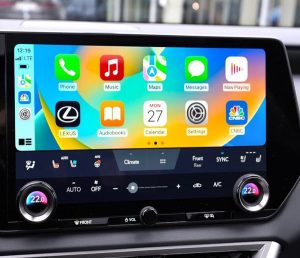


Lexus CarPlay / Android Auto: Retrofit Kits and Gen 10 Activation
Lexus CarPlay and Android Auto upgrades usually come down to one question: do you need a hardware retrofit module, or can your car enable the function with an OEM firmware update. This category covers both options, so you can pick the correct route and keep the factory screen in 2026.
Hardware retrofit module: wireless CarPlay and Android Auto
If your Lexus does not have CarPlay/Android Auto from the factory, the retrofit module is the common solution. It keeps the OEM look and adds phone projection as an extra mode on the original display.
Compatible models (as listed for the retrofit module)
- RX 2016–2018
- NX 2014–2018
- UX 2018–2019
- LX 2014–2019
- CT 2014–2019
- LS 2014–2019
- ES 2014–2019
- GS 2014–2019
- LC 2014–2019
- IS 2014–2019
- RC 2014–2019
What owners use it for day to day
- Wireless Apple CarPlay (Bluetooth pairing with Wi-Fi data)
- Android Auto support plus Android screen mirroring on supported phones
- Wired CarPlay option when you want a cable connection and charging
- Apps on the factory screen, including phone navigation and music apps
- Control through OEM buttons, so no extra controls are needed
Extra functions shown in the kit listing
- Aftermarket camera inputs for front, rear, and 360 setups (dynamic guidelines where supported)
- USB flash drive playback for music and video through the kit USB port
- Adjustable EQ inside the interface menu
- HDMI input for supported devices
- Plug and play setup with no encryption required
OEM firmware update: Lexus Gen 10 factory activation
Some Lexus Gen 10 systems can enable factory CarPlay/Android Auto with an OEM firmware update instead of adding a retrofit module. This is a digital product delivered by email, so there is no shipping. You receive download links and a step-by-step guide, typically Same Day or Next Day.
Compatible models (as listed for the Gen 10 update)
- ES 2018–2019
- NX 2017–2019
- UX 2017–2019
Before you order (quick version check)
Check your version screen in MENU, then SETUP, then UPDATE SOFTWARE. If you send a photo of that screen to support, we will confirm the correct option and help you avoid the wrong purchase.
Delivery, trust, and support
Physical CarPlay / Android Auto integration kits are shipped with tracking and are typically delivered via DHL. Digital activation updates are delivered by email with instructions, with no shipping.
Trustpilot: Navi-World is rated “Excellent” — https://uk.trustpilot.com/review/navi-world.com
Tech support and compatibility check: https://navi-world.com/contact-us/