
What Exactly is the NTG System?
NTG is an abbreviation for New Telematics Generation. It represents the proprietary multimedia platform developed by Mercedes-Benz, forming the core of the vehicle’s infotainment system, officially known as COMAND (Cockpit Management and Data system).
The features, functionality, and specific specifications of the NTG system constantly evolve, depending entirely on the model and model year of your Mercedes-Benz vehicle.
Why Is Knowing the NTG Version Crucial?
Confirming the precise NTG version is a critical first step before attempting any modifications, upgrades, or software maintenance. This includes purchasing aftermarket hardware (like CarPlay/Android Auto decoders or new displays) or updating core software components.
This is especially vital for Navigation Map Updates. Each NTG generation (e.g., NTG 4.5, NTG 5.1, or NTG 5.5) requires its unique map file format and a specific VIN-linked activation PIN code. Without knowing the exact version, you will not be able to download and install the correct map package for your region.
Choosing an incompatible NTG version will lead to:
- Mismatched cable interfaces (LVDS connectors).
- Screen size and resolution issues.
- The inability to install current navigation maps.
- Firmware conflicts, resulting in the device not functioning or causing glitches in the factory system.
🔎 Three Reliable Methods to Determine Your NTG Version
Relying solely on the production year is insufficient for accurate NTG identification. Due to variations in regional markets, trim levels, and specific models, different systems (e.g., Audio 20, NTG 4.5, or NTG 5.0) could be installed during the same year.
For the most accurate assessment, use a combination of the following methods:
1. 📅 Model Year Range (As a Primary Guide)
Use the year of manufacture as an initial reference, but never as the final confirmation:
| NTG Version | Production Period | Key Characteristics |
| NTG 1.0 / 2.0 | ~2002 – 2009 | Earlier systems, often CD-based navigation. |
| NTG 2.5 | ~2009 – 2011 | Integrated factory Bluetooth functionality. |
| NTG 3 / 3.5 | ~2005 – 2013 | Typically found in flagship S-Class and CL-Class models. |
| NTG 4.0 / 4.5 / 4.7 | ~2011 – 2015 | Widely used across models like W204, W212, W166. |
| NTG 5.0 / 5.1 / 5.2 / 5.5 | ~2014 – 2018 | New generation with larger screens and the introduction of a touchpad controller. |
| NTG 6.0 / 7.0 (MBUX) | 2018 onwards | Current systems featuring advanced voice assistants and dual-screen displays. |
Important Note: The actual version may differ based on the sales market, specific model, and the vehicle’s trim level.
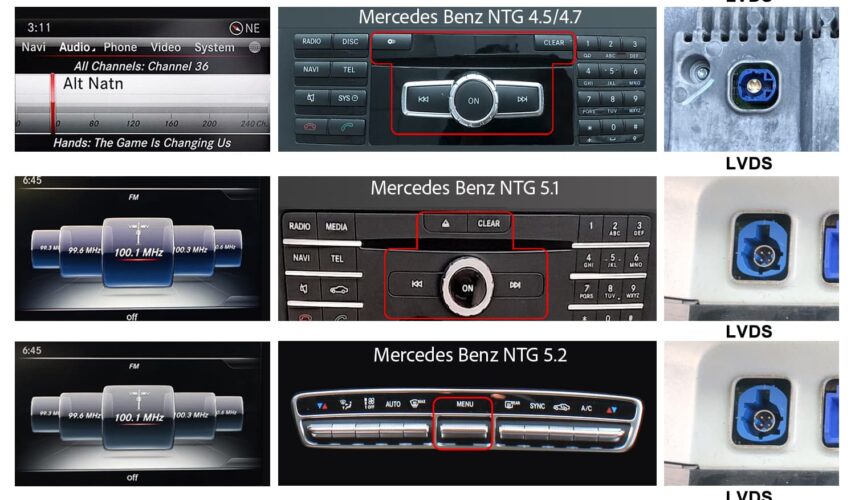
2. 🔌 Visual Inspection (Interface, Panel, and LVDS Plug)
The most reliable method for both hardware and map compatibility is a visual inspection of these three critical components:
- Radio Menu and Interface: Each NTG version has a unique Graphical User Interface (GUI) and menu structure, making it easy to distinguish between generations (e.g., the visual difference between NTG 5.2 and NTG 5.1).
- CD/DVD Control Panel: Check for differences in the style, layout, and function of physical buttons (e.g., the presence or absence of a numeric keypad).
- LVDS Plug (Video Input): This is the single most definitive indicator. The type and number of pins (e.g., 4-pin vs. 10-pin) on the video signal connector running to the factory monitor unambiguously confirm the specific system version (NTG 4.0, NTG 4.5, NTG 5.0, etc.).

3. 🔢 Using a VIN Decoder
For official and precise factory data, use your vehicle’s VIN:
- Locate the VIN (Vehicle Identification Number) on your vehicle’s documentation or body.
- Use an official dealership service or a reputable online VIN decoder.
- The decoder will provide the exact specifications of the factory-installed equipment, including the precise COMAND/NTG system version code.
Send us your VIN, and we’ll identify your system and the right update for your vehicle.
9BMWF4AW0KM010749
Gostaria de saber a versão do NTG da minha Mercedes-Benz C180 2018 /2019
Hello
this sd card will fit
https://navi-world.com/product/europe-mercedes-a2059062707-sat-nav-sd-card-garmin-map-pilot-v12-0-2024-2025/
Hallo,
Ich möchte ein Kartenupdate für meinen Mercedes W204 c250 cdi Baujahr 05.2011 T-model
VIN WDD 204203-1F-796939
Hello
this one
https://navi-world.com/product/mercedes-benz-comand-online-ntg-45-47-europe-v20-2022/
I am looking to Upgrade the Map in in 2015 E350; Vin WDDHF8JB9FB157478 . Also need to know how to perform the upgrade.
Thank you
Hello
please send us photo of your head unit
Buenos tenéis actualización de mapas para mi coche?
WDD2050011R564634
Gracias
Hello
Yes we do
https://navi-world.com/product/europe-mercedes-a2059062707-sat-nav-sd-card-garmin-map-pilot-v12-0-2024-2025/
Hello,
I am interested in purchasing a map update for my Mercedes R231 (2013 model year) How can I tell what version I currenly have? I have had the car for about a year and feel I need an update, but I dont know what map version is loaded on the car now. Maybe it was updated by the previous owner or not-
Also can this be purchased on an SD card rather than a download?
VIN# WDDJK7DAF009134
Thank you,
Bill Killinger
Hello
Please double check your VIN. Should be 17 digits