
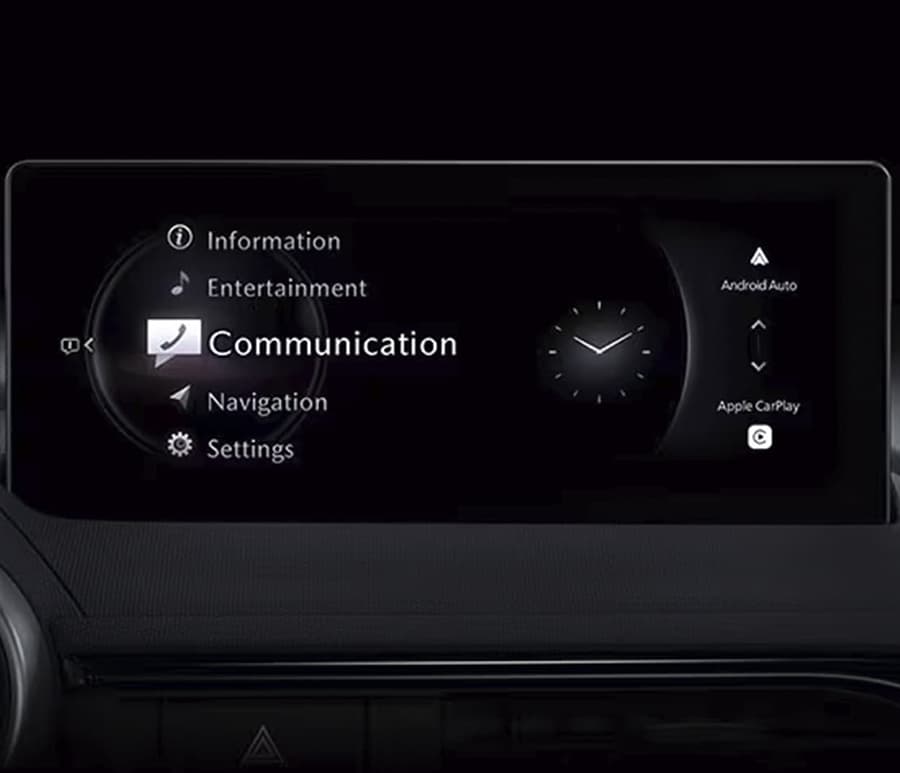
Telematics Communication Unit (TCU) Updates for vehicles from North America market
How to find your TCU part number and TCU software version version?
On some vehicles, the instrument panel may display a “TCU Malfunction” message with DTC U3000:00-TCU (Emergency Call/Telematics Unit Internal Malfunction) stored in memory. A firmware update is required.
| Model | TCU Software Part Number | File Name | Software Version | |
| 2021-2023 Mazda3 vehicles built after July 1, 2021 |
BGMC-67CK3-H | TCU_7000T11-0501_8013.kwi | 10019 | |
| Mazda3 (JM1) 2024-current | BJFN-67-CK3-A | TCU_7000T11-0901_10006.kwi | 10006 | |
| Mazda3 (3MZ) 2024-current | BJGT-67CK3-A | TCU_7000T11-1201_10007.kwi | 10007 | |
| 2021-2023 CX-30 vehicles built after July 1, 2021 |
DHTV-67CK3-H | TCU_7000T11-0601_8013.kwi | 10019 | |
| 2024 CX-30 | DRVP-67CK3-A | TCU_7000T11-1101_10008.kwi | 10008 | |
| 2021-2023 CX-5 | KJK9-67CK3-F | TCU_7000T11-0301_8041.kwi | 10065 | |
| 2024 CX-5 | KJK9-67CK3-F | TCU_7000T11-0301_10065.kw | 10065 | |
| 2023-2024 CX-50 (VA) | VA40-67CK3-C | TCU_7000T11-0101_8026.kwi | 10038 | |
| 2021-2023 CX-9 | TC3M-67CK3-F | TCU_7000T11-0201_8041.kwi | 10065 | |
| CX-90 | KMV6-67CK3-A | TCU_7000T11-0701_10072.kwi | 10072 | |
| CX-70 Canada Spec | KEMH-67CK3-A | TCU_7000T15-1001_11640.kwi | 11640 | |
| 2022 MX-30 | DN4E-67CK3-E | TCU_7000T11-0001_8015.kwi | 10021 | |
| 2023 MX-30 | DJBE-67CK3-A | TCU_7000T11-0011_8030.kwi | 10048 | |
TCU Software Part Number where can be found?
Preparation
1. Before the update procedure, if the customer is using the MyMazda App, explain the following to them.
During the repair, DO NOT use the remote control features (remote engine start/stop, remote door lock/unlock, turn on /off hazard warning lights) with the MyMazda App.
The malfunction information may be sent for the DTC detected during the repair.
2. Delete all files from the USB memory stick.
3. Download the following files to the USB memory stick.
Update Instructions
1. Maintain battery voltage using charger. 20A or larger current is recommended.
2. Switch the ignition to ACC.
CAUTION: To avoid damaging the telematics communication unit, do not turn the ignition switch to OFF or disconnect the battery terminal during the reprogramming.
NOTE: DO NOT activate the Communications Restricted mode while the reprogramming. This is to avoid potential concern on the telematics communication unit that may occur if the Communications Restricted mode is deactivated under unintended situations.
3. Insert the USB memory stick to a USB port located in the rear console.
NOTE: The memory stick can be inserted into either USB port.
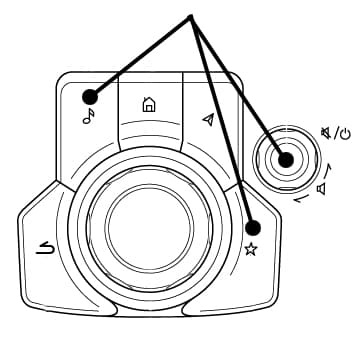
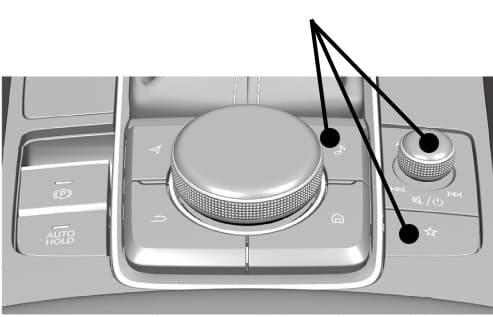
4. Press and hold the Volume knob, then press and hold the Entertainment and Favorites buttons at the same time for 3-5 seconds and the Factory /Service Inspection screen will appear.
5. Select “Device Program Update”.
6. Select “System Update”.
7. Select “USB” and the system will start checking for the update file.
8. Confirm the correct software version is shown under “Update Version” and select “TELEMATICS UNIT”.
9. Select “OK” on the screen and wait until the update (loading) is completed.
NOTE: DO NOT switch the ignition OFF until the update (loading) is completed.
10. Select “OK” on the screen below. The data update will start automatically after 10 seconds if “OK” is not selected.
NOTE: After selecting “OK”, the system will reboot and the display will turn black, followed by a “Verifying update file(s)” screen.
11. Wait until the update is completed.
NOTE: The system will reboot several times during the update process.
12. Press the commander knob to reboot the system.
13. After rebooting is completed, remove the USB memory stick from the USB port.
14. Repeat step 4 to go to Factory/Service Inspection screen.
15. Select “Service Information”.
16. Select “TCU Linked Information”.
17. Scroll down to the TCU Software Version and confirm that the software version has been updated to the following:
CX-5 and CX-9 – 00010020 or later
Mazda3 and CX-30 – 00010004 or later
18. Push Return multiple times to return to the top page of the Factory/Service Inspection screen, then select “End Diag Mode” to return to the normal screen.
19. Switch the ignition to the OFF position and wait 30 seconds.
20. Switch the igniion to the ON position.
21. Check if DTC(s) are stored using the Mazda Modular Diagnostic System (M-MDS), using Mazda Diagnostic And Repair Software (MDARS). If any DTC’s are present, clear the DTC(s).
Reviews
There are no reviews yet.